Selected moment
01
Match analysis
Use summaries, rounds, events, utility, scoreboards and player context to understand why a match moved.
Full 3D demos, Deathmatch, skins and Replay Moments live together in one CS2 Browser Lab.
Full 3D demo replays, Deathmatch, a first-person skin viewer and playable Replay Moments—all in your browser.
Watch matches in a full 3D demo viewer, play Deathmatch, inspect current CS2 weapon finishes in first person, and turn recorded deaths into playable Replay Moments—all in your browser.
Free users can watch demos and review matches. PRO unlocks unlimited uploads, all replay moments, standalone maps, x-ray, screenshots, share links and future advanced tools.
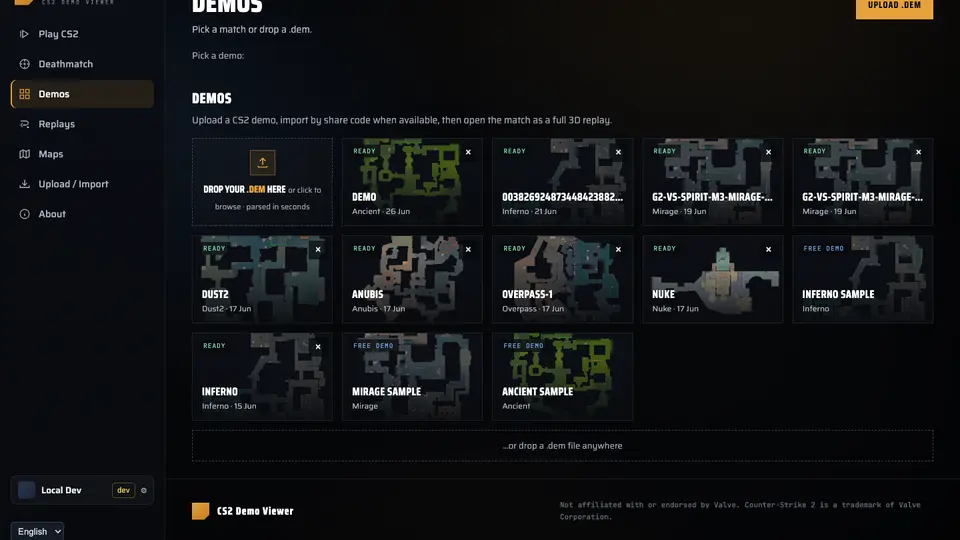
Upload a .dem and watch every round in full 3D with POVs, utility, scoreboards and free camera.
Practice aim against bots, create a browser room or join an open Deathmatch session.
Inspect current CS2 finishes with first-person arms, animations, wear, patterns and gameplay lighting.
Watch the real mistake, take control, change the outcome and earn a grade on the replay.

Use summaries, rounds, events, utility, scoreboards and player context to understand why a match moved.
Inspect smokes, flashes, HE paths, molotovs and timing windows so review becomes repeatable utility work.
Open maps without a demo, inspect geometry, walk routes, check angles and capture clean screenshots.
Drop a CS2 .dem file or paste a supported share code.
Scrub rounds, follow players, switch POV, inspect utility and open the scoreboard.
Use summaries, events, utility review and nade context to find patterns.
Turn deaths into playable replay moments and use Pro to unlock the full set.
Free gets you into demos and match review. PRO is for players who want the full workflow: unlimited uploads, every replay moment, standalone maps, walk mode, x-ray, screenshots, share links and priority access to future analysis, nade and practice tools.
Yes. Upload a Counter-Strike 2 .dem file to Memorin and it becomes a full 3D browser replay with real map geometry, player movement, utility, HUD, POV, follow and free-camera controls.
Memorin is a CS2 Browser Lab with a full 3D demo viewer, browser Deathmatch, a first-person skin viewer and playable Replay Moments.
Free signed-in accounts can upload two demos per rolling 24 hours, retain five demos, and upload files up to 400 MB. Memorin PRO adds unlimited uploads up to 800 MB each, every replay moment, standalone maps, walk mode, x-ray, screenshots and share links.
Private demos and parsed replay data are available only to the account that uploaded them. Memorin retains private demos and derived caches for 30 days by default, and account controls let users delete individual demos or their account. Read the privacy and retention policy.
No. Memorin is not affiliated with or endorsed by Valve. Counter-Strike 2 is a trademark of Valve Corporation.
No download, no client. Sign in with Steam and start with demos, review and samples. Free accounts can upload 2 demos per rolling 24 hours and retain 5; PRO unlocks unlimited uploads up to 800 MB each and the full practice toolkit.